知乎网页夜间模式 – 篡改猴脚本
2025年12月18日更新:记住状态,第一次自动按记忆状态请求,可切换
// ==UserScript==
// @name         知乎夜间模式切换器 (自动记忆版)
// @namespace    http://tampermonkey.net/
// @version      3.0
// @description  自动记忆白天/夜间模式(90天Cookie),启动浏览器后自动纠正模式。点击右下角按钮切换,仅在需要时刷新。支持专栏和问题相互兼容状态
// @author       Gemini & NGC13009
// @match        *://*.zhihu.com/*
// @match        *://zhihu.com/*
// @grant        GM_addStyle
// @run-at       document-start
// ==/UserScript==

(function() {
    'use strict';

    // --- 配置常量 ---
    const COOKIE_NAME = 'userscript_zhihu_theme_pref';
    const COOKIE_DAYS = 90;

    // --- 工具函数:Cookie 操作 ---
    function setCookie(name, value, days) {
        let expires = "";
        if (days) {
            const date = new Date();
            date.setTime(date.getTime() + (days * 24 * 60 * 60 * 1000));
            expires = "; expires=" + date.toUTCString();
        }
        // 设置 domain 为 .zhihu.com 以便在 www 和 zhuanlan 之间共享配置
        document.cookie = name + "=" + (value || "") + expires + "; domain=.zhihu.com; path=/";
    }

    function getCookie(name) {
        const nameEQ = name + "=";
        const ca = document.cookie.split(';');
        for(let i = 0; i < ca.length; i++) {
            let c = ca[i];
            while (c.charAt(0) === ' ') c = c.substring(1, c.length);
            if (c.indexOf(nameEQ) === 0) return c.substring(nameEQ.length, c.length);
        }
        return null;
    }

    // --- 核心逻辑:状态检查与自动跳转 ---
    // 1. 获取用户偏好,如果不存在则默认为 'dark' (满足“第一次启动默认请求暗黑”的需求)
    let preferredTheme = getCookie(COOKIE_NAME);
    if (!preferredTheme) {
        preferredTheme = 'dark';
        setCookie(COOKIE_NAME, 'dark', COOKIE_DAYS);
    }

    // 2. 检查当前 URL 是否包含 theme 参数(如果是用户点击按钮刚刚刷新过,需要更新 Cookie)
    const urlParams = new URLSearchParams(window.location.search);
    const urlTheme = urlParams.get('theme');

    if (urlTheme && ['light', 'dark'].includes(urlTheme)) {
        // 如果 URL 显式指定了 theme,以 URL 为准更新 Cookie
        if (urlTheme !== preferredTheme) {
            preferredTheme = urlTheme;
            setCookie(COOKIE_NAME, urlTheme, COOKIE_DAYS);
        }
    }

    // 3. 检查页面实际渲染的主题 (知乎通常在 html 标签上有 data-theme 属性)
    // 注意:@run-at document-start 时 document.documentElement 可能还没准备好属性,
    // 但通常 html 标签是存在的。如果取不到,默认为 'light'。
    const getActualTheme = () => document.documentElement.getAttribute('data-theme') || 'light';

    // 监听页面加载状态,尽早执行判断
    const enforceTheme = () => {
        const currentTheme = getActualTheme();

        // 只有在以下情况才刷新:
        // 1. URL 里没有 theme 参数 (避免死循环)
        // 2. 当前显示的模式 != 用户偏好的模式
        if (!urlParams.has('theme') && currentTheme !== preferredTheme) {
            // console.log(`[知乎夜间模式] 检测到模式不匹配。当前: ${currentTheme}, 偏好: ${preferredTheme}. 正在修正...`);
            urlParams.set('theme', preferredTheme);
            window.location.replace(window.location.pathname + '?' + urlParams.toString() + window.location.hash);
        }
    };

    // 立即执行一次检查
    enforceTheme();
    // 确保 DOM 加载后再次检查(防止 data-theme 是后来加上去的)
    window.addEventListener('DOMContentLoaded', enforceTheme);


    // --- 界面逻辑:注入按钮 ---
    const initUI = () => {
        // 注入样式
        if (!document.querySelector('#userscript-theme-style')) {
            const style = document.createElement('style');
            style.id = 'userscript-theme-style';
            style.textContent = `
                .toggle-dark-theme-button {
                    padding: 0;
                    position: fixed;
                    right: 12px;
                    bottom: 60px;
                    font-size: 1.6rem;
                    color: #1e1e1e;
                    background-color: #fff;
                    cursor: pointer;
                    text-align: center;
                    vertical-align: middle;
                    z-index: 9999;
                    width: 40px;
                    height: 40px;
                    border-radius: 4px;
                    transition: all 0.2s ease-in-out;
                    display: flex;
                    justify-content: center;
                    align-items: center;
                    line-height: inherit;
                    border: none;
                    box-shadow: rgba(0, 0, 0, 0.1) 0px 1px 3px;
                }
                html[data-theme="dark"] .toggle-dark-theme-button {
                    background-color: #333;
                    color: #ddd;
                }
            `;
            document.head.appendChild(style);
        }

        const ensureButtonExists = () => {
            if (document.querySelector('.toggle-dark-theme-button')) return;

            let toggleButton = document.createElement('button');
            toggleButton.className = 'toggle-dark-theme-button';

            // 根据当前偏好设置图标
            // 如果想要黑夜(当前是白天),显示 🌑
            // 如果想要白天(当前是黑夜),显示 ☀️
            const isDark = preferredTheme === 'dark';
            toggleButton.textContent = isDark ? '☀️' : '🌑';
            toggleButton.title = isDark ? '切换到日间模式' : '切换到夜间模式';

            document.body.appendChild(toggleButton);

            toggleButton.addEventListener('click', () => {
                const newTheme = preferredTheme === 'dark' ? 'light' : 'dark';

                // 1. 设置 Cookie
                setCookie(COOKIE_NAME, newTheme, COOKIE_DAYS);

                // 2. 刷新页面应用
                const params = new URLSearchParams(window.location.search);
                params.set('theme', newTheme);
                window.location.href = window.location.pathname + '?' + params.toString() + window.location.hash;
            });
        };

        const observer = new MutationObserver(ensureButtonExists);
        observer.observe(document.body || document.documentElement, { childList: true, subtree: true });
        ensureButtonExists();
    };

    // UI 初始化可以在 DOMContentLoaded 之后进行,不影响主题强制逻辑
    if (document.readyState === 'loading') {
        document.addEventListener('DOMContentLoaded', initUI);
    } else {
        initUI();
    }

})();
写了个篡改猴脚本,帮大家补上知乎开发们忘了的功能按钮。
大多数知乎用户可能不知道,给知乎的url添加一个?theme=dark请求到的其实就是夜间模式的网页。
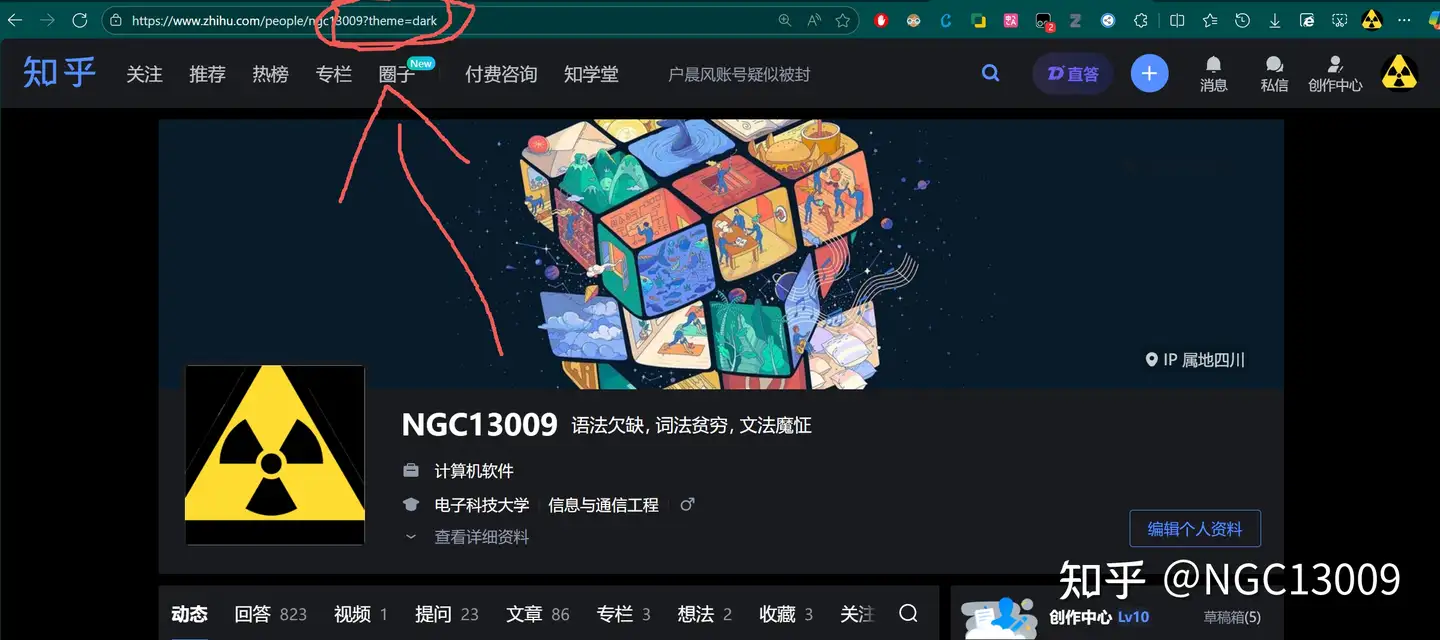
之后请求到的网页都是黑暗模式的了。
需要切换回阳间模式,只需要使用?theme=light即可。
逆天的是,知乎明明有这个功能,但是却完全在网页上没有做任何可以切换的按钮。
因此,这里用ai写了个篡改猴脚本,帮大家把这个按钮补充到页面右下角:
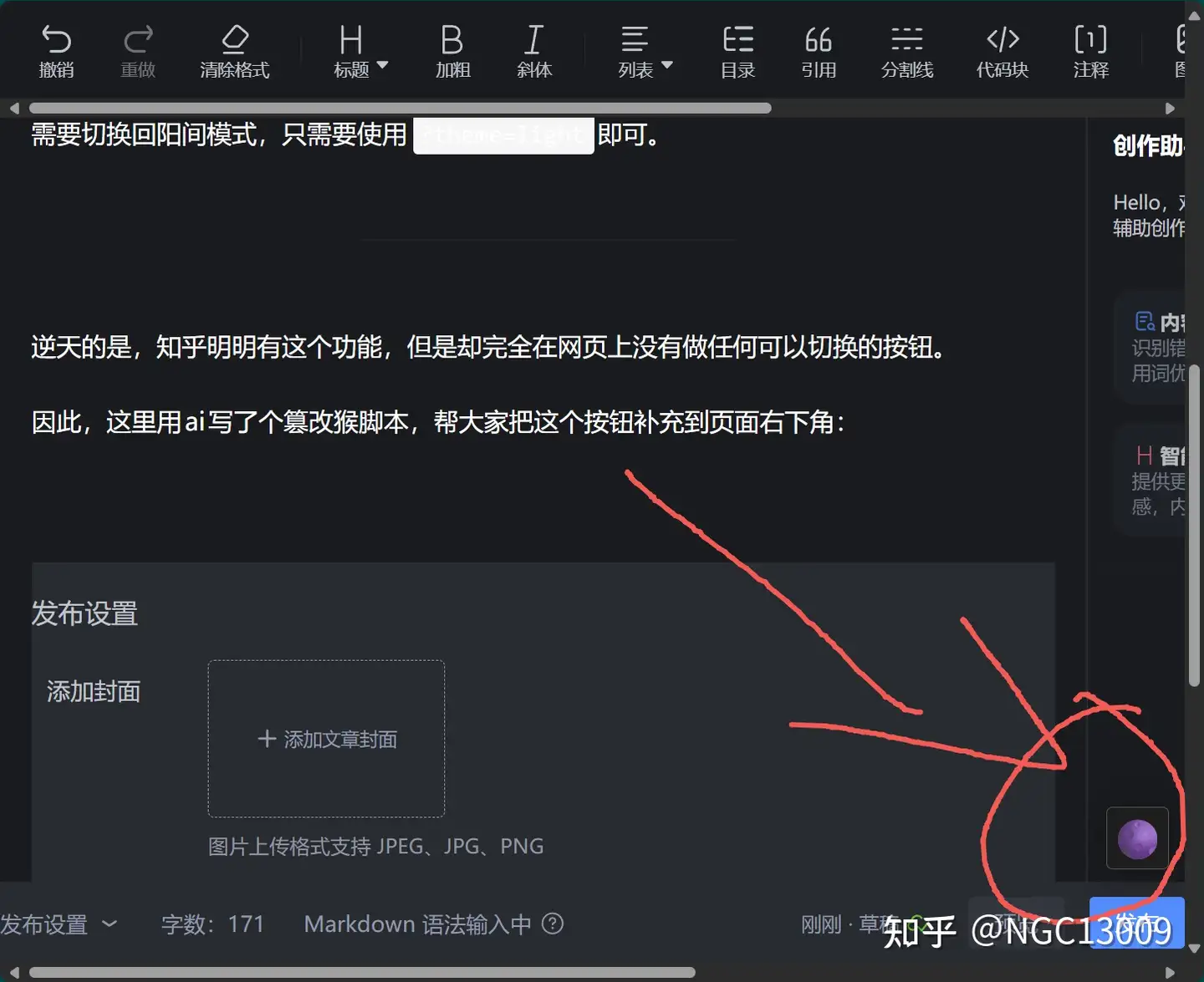
功能是:
- 点一下重新请求网页,并切换白天/夜间模式(注意如果在主页的话会导致主页刷新,必须先点开自己想看的内容再切换,否则你大概率再也刷不出他们了)
- 用一个90天的cookie记住用户的选择
值得注意的是,在一个页面切换后,其他已经打开的标签页面并不会同步切换,你需要手动刷新他们。
白天和黑夜的按钮logo是utf8字符中的“满月”和“新月”,我用这两个是因为他们看着像开启或关闭的灯泡。如果你强制使用了非浏览器默认字体,可能看起来不太一样。
代码
将下面的代码复制并粘贴到篡改猴的新脚本编辑器内,保存,再打开任何新的知乎标签或刷新当前页面会自动生效。
篡改猴是一个浏览器插件,edge,chrome以及各种国产套壳浏览器都理论上支持:
篡改猴 – Microsoft目前已知问题:
1. 夜间模式下,重启浏览器后,cookie可能还记住的是夜间模式,但是网页请求的是白天的,这个时候连续点击切换按钮两次,强制发送一次夜间模式即可
2. 专栏和其他回答并不是一个子域名,因此专栏是独立控制黑夜模式的。如果遇见和1相似的问题,那么一样的解决办法。
// ==UserScript==
// @name         知乎夜间模式切换器
// @namespace    http://tampermonkey.net/
// @version      2.0
// @description  在页面右下角添加一个按钮,点击后通过添加URL参数(?theme=dark)并刷新,来切换到夜间模式。
// @author       Gemini & NGC13009
// @match        *://*.zhihu.com/*
// @match        *://zhihu.com/*
// @grant        GM_addStyle
// ==/UserScript==

(function() {
    'use strict';

    // --- 1. 注入按钮样式 ---
    GM_addStyle(`
        .toggle-dark-theme-button {
            padding: 0;
            position: fixed;
            right: 12px;
            bottom: 60px;
            font-size: 1.6rem;
            color: #1e1e1e;
            background-color: #fff;
            cursor: pointer;
            text-align: center;
            vertical-align: middle;
            z-index: 9999;
            width: 40px;
            height: 40px;
            border-radius: 4px;
            transition: all 0.2s ease-in-out;
            display: flex;
            justify-content: center;
            align-items: center;
            line-height: inherit;
            border: none;
            -webkit-box-align: center;
            -webkit-box-pack: center;
            box-shadow: rgba(0, 0, 0, 0.1) 0px 1px 3px;
        }
    `);

    // --- 2. 强力注入按钮 (使用 MutationObserver) ---
    const ensureButtonExists = () => {
        // 如果按钮已存在,则无需重复创建
        if (document.querySelector('.toggle-dark-theme-button')) {
            return;
        }

        // 创建按钮元素
        let toggleButton = document.createElement('button');
        toggleButton.className = 'toggle-dark-theme-button';
        toggleButton.textContent = '🌑'; // 设置固定图标

        document.body.appendChild(toggleButton);

        // 添加点击事件
        toggleButton.addEventListener('click', () => {
            // 1. 获取当前URL的查询参数
            const params = new URLSearchParams(window.location.search);

            // 2. 设置 theme 参数为 'dark'
            params.set('theme', 'dark');

            // 3. 构建新URL并刷新页面
            window.location.href = window.location.pathname + '?' + params.toString() + window.location.hash;
        });
    };

    // 使用 MutationObserver 确保按钮在知乎这种动态加载内容的页面中也能被成功创建
    const observer = new MutationObserver(ensureButtonExists);
    observer.observe(document.documentElement, { childList: true, subtree: true });

    // 页面加载后立即尝试创建一次按钮
    ensureButtonExists();

})();
2025年11月1日